Game On🎮: Automating Game Server Scaling For Peak Performance Through Amazon Auto Scaling Groups
- Gladys wairimu
- Apr 15, 2025
- 5 min read

In Today’s Read:
👱Client’s Key Challenges
✍️Creating User Requirements
☁️Architectural Design
📈Implementation:
Task 1: ✅Create AMI of Game Server
Task 2: ✅Launch Template
Task 3: ✅Create Target Tracking Scaling Policy
Task 4: ✅Create a Scheduled Actions
🎯Results and Benefits
💡Areas of Improvement
Hi friends, welcome 😃
This week’s lab challenge was exciting to say the least. I got a first hand glimpse into the world of gaming🥳, particularly the behind-the-scenes mechanics that make gaming a seamless and near real-time experience for players. Did you know the League of Legends uses AWS for various aspects of their infrastructure like game servers, content delivery and databases?
Today, I’ll show you how I helped my client automate the provisioning of servers, ensure they are available during peak times and cut down on unnecessary costs using Amazon Auto Scaling Groups. .
👱(Real-life scenario) Client’s Key Challenges
My client is a Chief Gaming Officer for a gaming café that regularly hosts gaming parties where they allow their users to host servers for their own games. However, he faces a couple of challenges. Firstly, disruptions sometimes occur when their server crashes. Getting them back takes too long. Secondly, while they have a daily limit on the number of servers users can provision, they lack a way to enforce this limit, potentially leading to over-provisioning and increased costs. Lastly, my client hosts a large gaming party every week and needs a way to make servers available only during the duration of the game party.
In his own words, my client said:
“We have a maximum number of EC2 instances that we allow users to provision each day but we do not have controls to enforce this rule… If an EC2 crashes, we have no automatic way to replace it. We want users to stay within their server provisioning limit. A large party is booked from 8:00PM to 1:00AM every Tuesday. The moment the party starts, we want servers up and ready. The moment the party ends, we want the servers to shut down.”

✍️Creating User Requirements
From what my client expressed, we can gather these user requirements:
The solution must automatically replace crashed EC2 instances to minimize service disruptions for users hosting game servers.
The system must enforce a daily limit on the number of EC2 instances users can provision.
The system must automatically start game servers every Tuesday at 8:00 PM and shut them down every Wednesday at 1:00 AM following the Tuesday game party..
☁️Architectural Design

The design above illustrates how two scheduled auto scaling actions and one auto scaling policy are used to implement auto scaling. Using the first policy, 2 servers will be added every Tuesday at 8PM. The second policy dictates that all instances be reduced to zero everyday at 1AM. These two policies help to meet the client’s requirements to make servers available only at specific times during Tuesday’s game parties, and to make them unavailable after 1AM each day. Additionally, the auto scaling group policy keeps a minimum of 2 servers running and a maximum of 4 servers running.
📈Implementation
Task 1: ✅Create AMI of Game Server
(An AMI is a point-in-time image of an EC2 instance that can be used to replicate instances with similar configurations. It captures details like the operating system, applications and data of the instance)
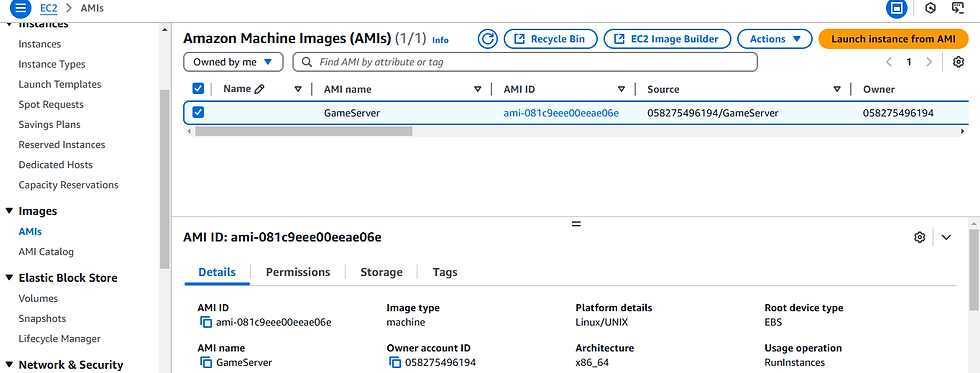
Before I got involved, my client already had an existing game server hosted on an EC2 instance. Hence, I started by creating an AMI of it. Since this EC2 instance was in a healthy state and contained the necessary gaming applications, it made for a good candidate from which to create an AMI that I would use to create other instances with the same settings.
Task 2: ✅Launch Template
(A launch template is a blueprint that defines the parameters of launching an EC2 instance. It includes settings like an AMI and more. It can then be used to automate instance launches).
Launch templates are great for on-demand launches with services like Auto Scaling Groups. So, I created a launch template with launch parameters that dictate the specifications of launching the EC2 instances that would be in an auto scaling group. Some of these configurations were the AMI ID of the AMI I created in the previous step, instance type, security group and tags.

Task 3: ✅Create Target Tracking Scaling Policy For an Auto Scaling Group
Target tracking scaling policies help to maintain a desired number of instances in an auto scaling group by monitoring a specified metric. Auto Scaling will then automatically adjust the number of instances in the group to keep the metric as close to a specified target value as possible.

In my case, my metric was the CPU utilization of an instance and my target value was 70%. So, if an instance’s CPU utilization exceeded 70%, then another instance should be launched automatically.


Task 4: ✅Set minimum and maximum number of instances
Specifying the minimum, maximum and desired number of instances tells your auto scaling group the number of instances it should keep up and running at any given time. It introduces boundaries to avoid over-provisioning and under-provisioning.

Task 5: ✅Create Scheduled Action
Scheduled actions allow one to scale resources in and out during specific times. They are great for predictable load changes. From our user requirements, my client expressed that he would like servers to be available from Tuesday 8:00 PM to 1:00 AM the following day. This requirement can be enforced using a scheduled action to ensure no servers are available to users past 1:00 AM Wednesday automatically.
To implement this, I created 2 scheduled actions. The first allows the provisioning of 3 to 4 servers at 8:00 PM Tuesday every week.

The second one reduces the number of instances to zero at 1:00 AM the next day,.

Creating these scheduled actions saves my client costs by making sure the servers are not running when they are not being used, and only run when they are being used.
🎯Results and Benefits
Executing this implementation bears the following results for my client:
Significantly reduces EC2 instance usage and cost by provisioning them only when needed.
Better resource utilization, minimizing idle resources.
Eliminates manual intervention to ensure server availability through scheduled actions.
💡Areas of Improvement
While the design and implementation discussed here helped to meet the client’s requirements, they don’t address some concerns not explicitly expressed by him and some that may occur in the future. Here are some considerations.
Implementation of a load balancer to distribute workload to instances in the auto scaling group efficiently, thus ensuring no single server becomes overwhelmed.
Sending notifications to my client when certain thresholds, e.g., CPU utilization, have been surpassed.
Using AWS Shield to protect my client’s system from DDOS attacks.
Whoah! What a ride! I’ve never played video games before, but doing this project inspired me to pick up a console and play some video games. Isn’t it wondrous how much behind the scenes goes into ensuring users’ gaming experience is smooth? For you gamers out there, what issues have you faced while playing online games that you think the implementation discussed here could help solve? Let me know in the comments.
Until next time—toodooloos! 😊


Comments