How I Solved a Client’s EC2 Performance and Management Challenges Using AWS
- Gladys wairimu
- Jan 25, 2025
- 3 min read

In Today’s Article:
🙍(Real-life example) Client’s Key Challenges
✍️Create User Requirements
⚒️Overview of Tools and Services I Used to Solve Client’s Challenges.
☁️Architectural Design
💯Results and Benefits
Hi friends, welcome 😃
Today, we’ll analyze challenges a client is facing with their existing EC2, discuss AWS services I used to solve these challenges as well as the outcome of the solution I came up with.
🙍(Real-life example) Client’s Key Challenges
For businesses running their systems and applications in the cloud (as smart business owners do 😉), ensuring their cloud infrastructures are running in an optimized and efficient manner is crucial. Doing so not only cuts unnecessary costs for businesses, but also ensures their services are always available to their clients when they need them, without delays.
My client had an application hosted on an EC2 instance but was facing performance and management issues. Here is what my client had to say verbatim:
“
…our EC2 instance hosting the scheduling app struggles with performance during peak times, managing instances across local environments is tedious, we need a way to retrieve instance metadata via scripts, scaling capacity based on demand isn’t efficient, and we want a unified tool to automate and control AWS services with scripts.
“
✍️Create User Requirements
It is important to derive user requirements to make sure one captures all the challenges clients need your help with in a clear way.
From what my client communicated, here are the user requirements:
Improve the performance of the EC2 instance hosting the scheduling application.
Easily access and manage the instance across different local environments.
Retrieve instance metadata through scripts.
Scale the computing capacity to handle peak times.
Control and automate various AWS services through scripts using a unified tool.
⚒️Overview of Tools and Services I Used to Solve Client's Challenges
To meet these requirements, I used the following AWS services:
Amazon EC2: to vertically scale the EC2 instance hosting the scheduling application by changing the instance type to a larger size that provides more CPU and memory resources
AWS Systems Manager: Session Manager is one of the capabilities of Systems Manager. I used it to connect to the EC2 instance and manage it securely without needing to open inbound ports or manage SSH keys.
AWS CLI or AWS SDK: I used AWS CLI to automate the management of various AWS services through scripts, providing a unified tool to control and automate your AWS environment.
☁️Architectural Design
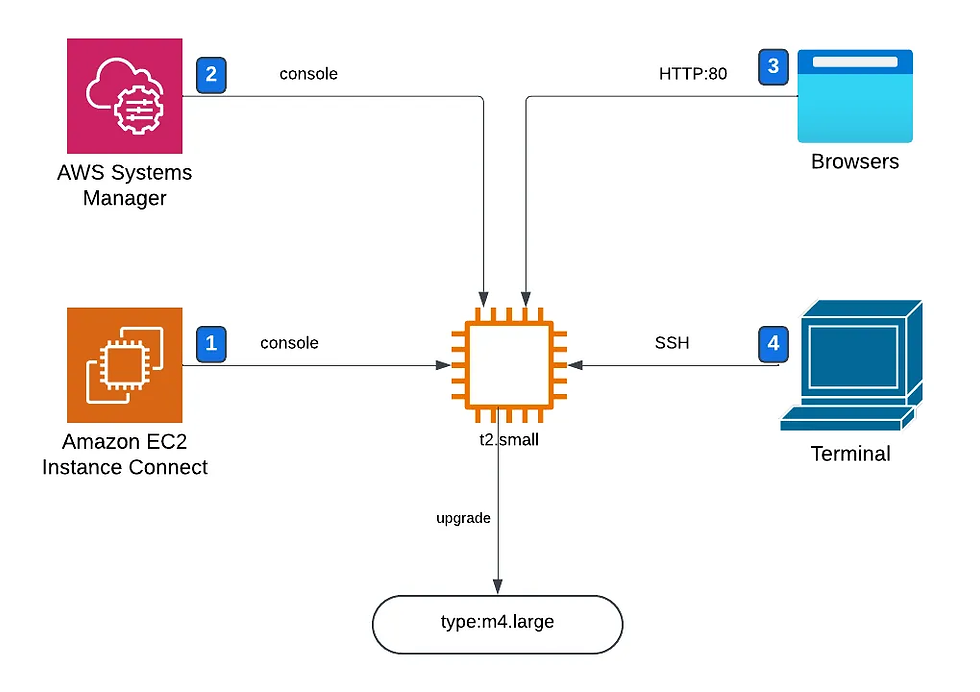
1. EC2 Instance Connect: I connected to the EC2 instance using EC2 Instance Connect from the Management Console.

2. AWS Systems Manager: I used Session Manager to connect to the EC2 instance without using SSH keys or inbound ports. Here are the commands I used and their outputs.

3. Browser: I used a browser to view the instance’s metadata by running its public IP address in a search bar.

4. Terminal: EC2 instances are also accessible through SSH clients by using terminal software on one’s local device.
5. type:m4.large: I upgraded the current instance to one with a large compute capacity to meet the growing compute requirements of the client.
💯Results and Benefits
Here are some quantifiable metrics implementing the above architecture produced for the client.
Increased CPU and memory capacity by over 200% through upgrading the EC2 instance from t2.small to m4.large.
Reduced time spent in managing instances by 50% by eliminating the need for manual SSH configuration and key management through using Systems Manager and EC2 Instance Connect.
Achieved 25% reduction in response time of the application through vertical scaling of the EC2 instance.
By leveraging AWS Systems Manager, EC2 Instance Connect and AWS CLI, I was able to securely access the client’s EC2 instance and provide him with an automated solution to manage his instance. I also improved the performance of his application held in the EC2 instance, by vertically scaling it.
What would you do differently? Let me know in the comments.
Well, friends, until next time — toodooloos! 😊


Comments